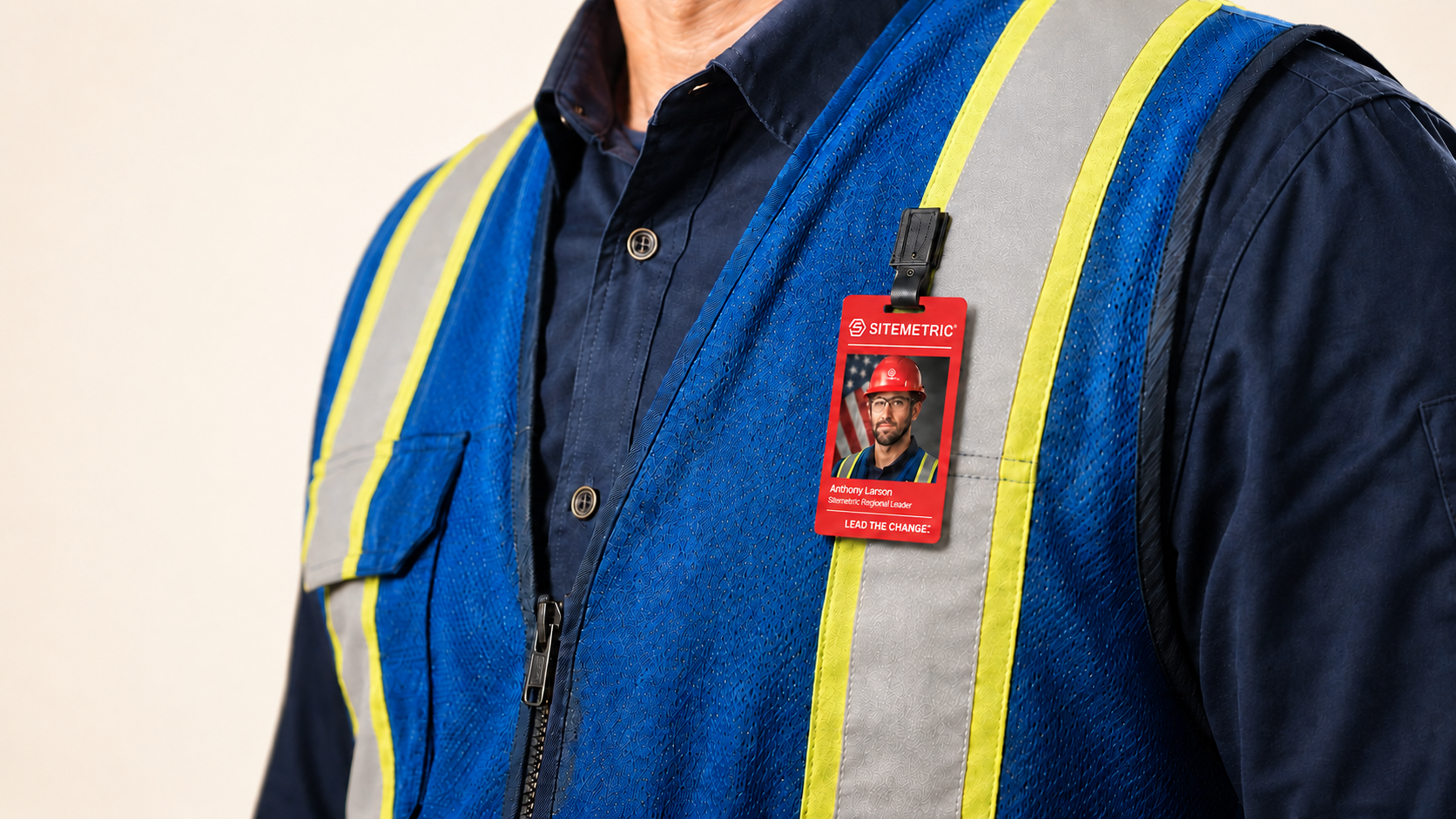
Sitemetric worker badge showing photo, name, trade, and company

Construction Site Badging: A Complete Guide

Construction site badging is the process of registering a worker, verifying their credentials, and issuing a badge that grants jobsite access. On an active project, that badge also records every entry and exit, which produces the daily headcount and attendance record a paper sign-in sheet cannot.

Key takeaways

  • Badging covers three steps: worker enrollment, credential verification, and access control at the gate.
  • A badge without a credential check behind it is a plastic card. The verification step is what confirms the worker is qualified to be onsite.
  • Modern badges typically carry several technologies, including barcode, QR, NFC, RFID, and BLE, so one credential works with readers, turnstiles, and doors.
  • Badging produces the daily headcount and attendance records that owners increasingly require.
  • Enrollment speed usually determines whether a badging program works. Slow enrollment creates a queue at the gate, and the trade stack loses hours waiting.

What is construction site badging?

Construction site badging is a credentialing system for a jobsite. Every worker who needs access, including direct employees, subcontractors, delivery drivers, and visitors, is registered in advance or at the gate, checked against the project requirements, and issued a badge that identifies them at every entry point.

Several terms describe the same practice: site badging, worker credentialing, jobsite ID, and site access badging. Contractors sometimes use "badging" to mean the whole access control program, including turnstiles and gate staffing. In practice, badging is the credentialing layer and access control is the enforcement layer.

The distinction matters when scoping a project. A badging system without enforcement produces a roster of who should be onsite. Enforcement without badging leaves gate staff with nothing to check a worker against.

How does construction site badging work?

Most badging programs follow the same five steps, whether the jobsite has 40 workers or 4,000.

1. Registration. The worker submits their information, including name, employer, trade, and contact details, either through a self-service link before arriving or at an enrollment station onsite. Pre-registration is usually faster because the worker does the data entry rather than gate staff.

2. Credential verification. The system checks required documentation: OSHA training, trade certifications, site-specific orientation, drug screening, or whatever the project mandates. Verification is what separates a badging system from an ID printer, because it confirms the worker meets the project requirements before a badge exists. Certifications carry expiration dates, and a badging system worth using tracks them and flags renewals before they lapse.

3. Badge issuance. Once the worker clears verification, a badge is produced and linked to their record. On active jobsites this typically happens on the spot, at a booth or trailer near the gate.

4. Site access. The worker presents the badge at a turnstile, reader, or staffed entry point. The system checks the credential against the current access list and either grants or denies entry, recording the event either way.

5. Reporting. Every entry and exit builds the record that produces daily headcount, hours by company and trade, and the compliance documentation owners ask for.

Badge types and credential technologies

Badges differ mainly in how they are read, and the read method determines which equipment a credential works with.

  • Barcode (1D/2D)
    • Reads: optical scan
    • Used for: handheld scanners, gate check-in, simple readers
  • QR code
    • Reads: optical scan, including phone cameras
    • Used for: flexible entry points, temporary gates, visitor passes
  • NFC
    • Reads: contactless tap, ISO 14443 / 18092
    • Used for: turnstiles, door readers, mobile credentials
  • RFID
    • Reads: contactless, longer read range than NFC
    • Used for: hands-free entry, high-throughput gates
  • BLE
    • Reads: Bluetooth Low Energy
    • Used for: zone-level detection, safety and mustering functions

Physical badge construction

The construction standard is CR80, the same size as a credit card at 3.375 by 2.125 inches, typically printed on 30-mil PVC. Badges are usually treated as part of required PPE, which improves compliance because workers are already used to a PPE culture, and wearable options vary by project.

Badge design

A well-designed badge communicates a worker status before anyone scans it. Trade, company, access level, and training status can all be read at a glance by a foreman or an Access Control Officer. Color coding by trade, training tag indicators, and project-specific access visuals each carry information that would otherwise require a scan or a question.

__wf_reserved_inherit

Badge assignment and lifecycle

A badge has a lifecycle, and how a system handles that lifecycle determines how much administrative work the badging program creates.

  • Assigned and unassigned badges. Physical credentials are typically ordered in batches and assigned to workers as they enroll. Visibility into which badges are assigned, which are held in reserve, and which company each one belongs to is what keeps a large jobsite from losing track of its own credentials.
  • Badges by company. On a project with dozens of subcontractors, a per-company badge count shows how much of the workforce each trade partner has credentialed. It is also a useful place to look when a subcontractor claims more workers than the badge record supports.
  • Revocation. When a worker leaves the project or is removed from it, the credential has to stop working immediately. A badging system should be able to deactivate access without collecting the physical card, and keep a record of workers who are no longer permitted onsite.
  • Inactive credentials. Badges that were issued but have not been used in weeks are worth reviewing. An unused credential often means a worker left without anyone updating the roster.

Badge sharing and how systems prevent it

Credential sharing is the most common integrity problem in a badging program: one worker scanning in on behalf of another. It inflates headcount, corrupts attendance records, and puts an unverified person onsite.

  • Anti-passback is the standard control. The system tracks whether a credential is currently inside or outside the jobsite and refuses a second entry scan on a badge that has not exited, so a badge cannot be passed back through the fence to a second worker.
  • Duplicate scan reporting catches cases anti-passback does not. Reviewing repeat scans on the same credential surfaces patterns worth investigating, and the review produces a record rather than a gate denial, which matters when the cause is a legitimate equipment issue.
  • Badge and no-badge visibility. Where AI cameras are deployed alongside badging, the system can flag a person onsite who has no associated badge event. That closes the gap between the credential record and what is happening at the gate.

Why badging matters on construction projects

  • Owner and insurer requirements. On mission-critical projects such as data centers, healthcare, government, and semiconductor fabs, credentialed access is often a contract requirement rather than an optional upgrade. Owners want documented proof that only authorized, qualified people entered the jobsite.
  • Emergency response. During an evacuation, the badging record shows how many people were onsite and whether everyone is accounted for at the muster point. Paper sign-in sheets are often inside the trailer the crew just evacuated.
  • Subcontractor accountability. Badge data shows which companies had crews onsite, on which days, at what headcount and how many hours. That is the foundation for validating manpower claims and resolving disputes against a record rather than recollection.
  • Compliance documentation. Certification tracking tied to badging means an expired credential surfaces before it becomes an audit finding.
  • Throughput at the gate. Gate throughput usually decides whether a badging program succeeds. Ten extra minutes per worker on a 1,000-person jobsite creates a productivity problem larger than the one badging solves, and crews tend to route around a system that slows them down.

What to look for in a construction site badging system

  • Enrollment speed. Ask for two numbers, registration and badge production, and ask what each assumes about pre-registration.
  • Gate throughput. Ask for people per minute, then multiply by peak crew size to see how long the morning queue runs.
  • One badge across projects. Ask whether a worker moving between projects has to re-enroll. A credential that follows the worker removes recurring administrative work.
  • Credential expiration handling. Ask whether the system alerts before a certification lapses, or only records it.
  • Badge sharing controls. Ask specifically about anti-passback and whether duplicate scans are reported.
  • Multiple entry points. Gate layouts change as the project phases. Ask how the system handles several entrances and what relocating an entry point involves.
  • Remote-site connectivity. Many jobsites start with no network infrastructure. Ask what happens when connectivity drops, and whether the gate keeps making access decisions and syncs later.
  • Reporting outputs. Ask to see an actual daily report, not a description of one.
  • Integrations. Badging data is more valuable when it reaches the systems the project team already uses.

__wf_reserved_inherit

How Sitemetric approaches construction site badging

Sitemetric issues a physical badge with an embedded beacon rather than a purely digital credential, and a single badge works across every jobsite on the account, whether or not that site uses a turnstile. Registration typically takes under a minute. More than 1.5 million workers across 40 states are on the Sitemetric platform, including 90% of the top 20 ENR contractors.

  • Register a worker in under 30 seconds. The Onsite ID Printing Station produces the badge onsite, with a 100-card hopper sized for shift-change queues. It deploys in a booth, a trailer, or on a portable table as jobsite phases move.
  • Badges that carry your project. Customer logos, trade color coordination, training tag indicators, and access level visuals.
  • Credentials that surface before they lapse. Worker registration captures profiles, industrial certifications, and project-required documentation, with certification expiration alerting built in.
  • One badge across every gate. The badge carries BLE, RFID, NFC, and QR, so it opens Sitemetric turnstiles and doors, verifies credentials at the gate, supports roll call, and works for emergency mustering.
  • Reporting without manual roll-ups. Daily Report, Headcount and Hours, Gate Traffic, Site Access, and Denied Access, all produced from the same access events.
  • Badge data and camera detection together. Where Sitemetric AI cameras are deployed on the same jobsite, a person present without an associated badge event is flagged, and the alert routes to JSOC (Joint Security & Operations Center) for review.
Explore Sitemetric Badging

FAQs

Badging is credentialing: registering workers, verifying their qualifications, and issuing an ID. Access control is enforcement: turnstiles, readers, gates, and staffed entry points that check that ID and permit or deny entry. Most projects need both, and they are usually deployed together.

Registration takes less than 30 seconds, and the Sitemetric Onsite ID Printing Station produces the badge onsite once the worker information and photo are captured. Workers who pre-register move through faster still, since the data entry is already done before they reach the gate.

Yes. A Sitemetric badge works across every jobsite and project on the account, so a worker moving between your jobs does not re-enroll each time.

Anti-passback enforcement prevents the same credential from being used to enter twice without an exit in between, so a badge cannot be handed back through the fence. Duplicate scan activity is also reported, so repeat patterns can be reviewed.

Yes. Badges can be customized with your company branding, including logos and custom colors.

Entry points are deployed where the jobsite needs them and relocated as phases change. Sitemetric turnstiles mount on a forklift-ready base with no anchor bolts or permanent infrastructure, and can be added or moved as gate layouts evolve.

Yes. Sitemetric turnstiles include 4G LTE cellular with automatic fallback and make access decisions on the device rather than in the cloud, so entry keeps working and events keep logging when connectivity drops.

The platform tracks credential expiration dates and issues certification expiration alerts, so a lapsing qualification surfaces before it becomes a compliance problem at the gate.

Sitemetric produces a Daily Report with headcount over the life of the project, Headcount and Hours by company, Gate Traffic covering entry and exit scans, Site Access, Denied Access, and badge-level reporting showing which credentials are assigned and to whom. Sitemetric AI works across the same records, so a question asked in plain language returns the answer without opening a dashboard or building a report.

Yes. Sitemetric integrates with Procore, Autodesk, and other systems, and offers API and SSO integration to connect access data with existing management tools.

The job moves fast.
Your tech should too.

Talk with our team about your jobsite needs and learn how Sitemetric can help your project succeed.